To track progressive overload, write down three things for every working set: the weight, the reps and the reps in reserve. Before each session, read last time's line for that lift, then apply one rule to it: add reps until every set reaches the top of your rep range, then add weight.
What do you write down to track progressive overload?
Three things for every working set: the weight, the reps and the reps in reserve. Progressive overload is doing a little more over time, and a log is how you know what "more" means. Without last time's numbers in front of you, you are guessing. For logging in general, on paper or a phone, see how to track workouts.
| Column | What goes in it | Why it is there |
|---|---|---|
| Weight | The load on the bar, per dumbbell or the machine setting | The dial that goes up second |
| Reps | The reps of each set, one number per set | The dial that goes up first |
| Reps in reserve | How many more reps you could have done | Tells a hard 6 from an easy 6 |
Reps in reserve (RIR) is the number you hold back. A set of 6 with 3 in reserve means you could have done 9. It was written up for resistance training as a rating scale in a 2016 article and RIGOR plans every set with it: reps in reserve explains the scale.
Write the reps of each set, not a total or an average. The rule that decides the next weight looks at every set, and a log of "4 × 6" hides the set that stopped at 5.
How do you track progressive overload in the gym?
Log each set when you finish it, one line per lift, and read last time's line before you pick up the bar. To compare sessions at different weights, see how to track gym progress.
A line in a notebook looks like this:
| Lift | Weight | Reps · RIR |
|---|---|---|
| Barbell Back Squat | 90 kg | 6, 6, 6, 6 · RIR 3 |
The first thing you do next session is read that line. Then you decide the target before the first set, so the workout is a test of the number rather than a feeling about it. If you write the day's target beside last time's line, the sheet does the app's job by hand.
RIGOR is a strength training app for iPhone that builds your plan and sets every weight by rules you can read.
YOUR IPHONE

What is the best way to track progressive overload?
The way you will actually keep doing, with a rule attached. A log you never read does not help, and a rule with no log has nothing to work on.
Paper, a notes file or an app all hold the same three columns. They differ in one thing: whether something works out the next target for you. The rule is short enough to run by hand. RIGOR's is double progression, summed up here:
- Keep the weight and add one rep to each set, up to the top of the rep range.
- When every set has reached the top, and no set felt much harder than planned, add the smallest step you can load.
- If a set falls below the bottom of the range, repeat the weight. Two sessions in a row below it at the same weight and the weight comes down 10%.
A study of 43 trained lifters over eight weeks compared the two ways of adding: more weight at fixed reps, or more reps at a fixed weight. Both worked. Muscle growth in one thigh muscle modestly favoured adding reps. Strength slightly favoured adding weight, a difference the authors called of questionable practical significance (Plotkin 2022). So the log only has to follow whichever dial you are turning.
A worked log: Barbell Back Squat from 90 kg to 92.5 kg
Four sets, rep range 4 to 6, a 20 kg bar. Here are five sessions as a paper log, with the effort written as 3 in reserve. The last column is what you write before the next session.
TOP OF THE RANGE4 REPS · BOTTOM
| Session | Weight | Reps · RIR | Next time |
|---|---|---|---|
| 1 | 90 kg | 5, 5, 4, 4 · 3 | Same weight, +1 rep per set |
| 2 | 90 kg | 6, 5, 5, 5 · 3 | Same weight, 6 on every set |
| 3 | 90 kg | 6, 6, 6, 5 · 3 | Same weight, 6 on every set |
| 4 | 90 kg | 6, 6, 6, 6 · 3 | Up to 92.5 kg × 5 |
| 5 | 92.5 kg | 5, 5, 5, 5 · 3 | Same weight, 6 on every set |
The numbers follow the double progression example step for step. Session 4 is the only one where every set sits at 6, so it is the only one that earns more weight. Sessions 1 to 3 each leave a set short of the top, which the log shows at a glance.
The effort column does one more job. Had session 4 been written 6, 6, 6, 6 · RIR 1, with 3 planned, the sets were two harder than planned and the weight would stay for another session. The same reps are not the same work.
How do you track progressive overload with an app?
Use one that holds last time next to today's target and tells you why the target moved. That is the half of tracking a notebook cannot do: compare, then decide.
After every workout RIGOR compares your completed sets with the last time you did that lift, then sets the next target and keeps the reason. The Why sheet shows both: all four sets reached 6 at 90 kg, so the next target is 92.5 kg for 5 reps.
The reps after a jump come from an estimate: 6 reps at 90 kg with 3 in reserve predicts 5 at 92.5 kg with 2 in reserve. It is the formula behind the 1RM calculator.
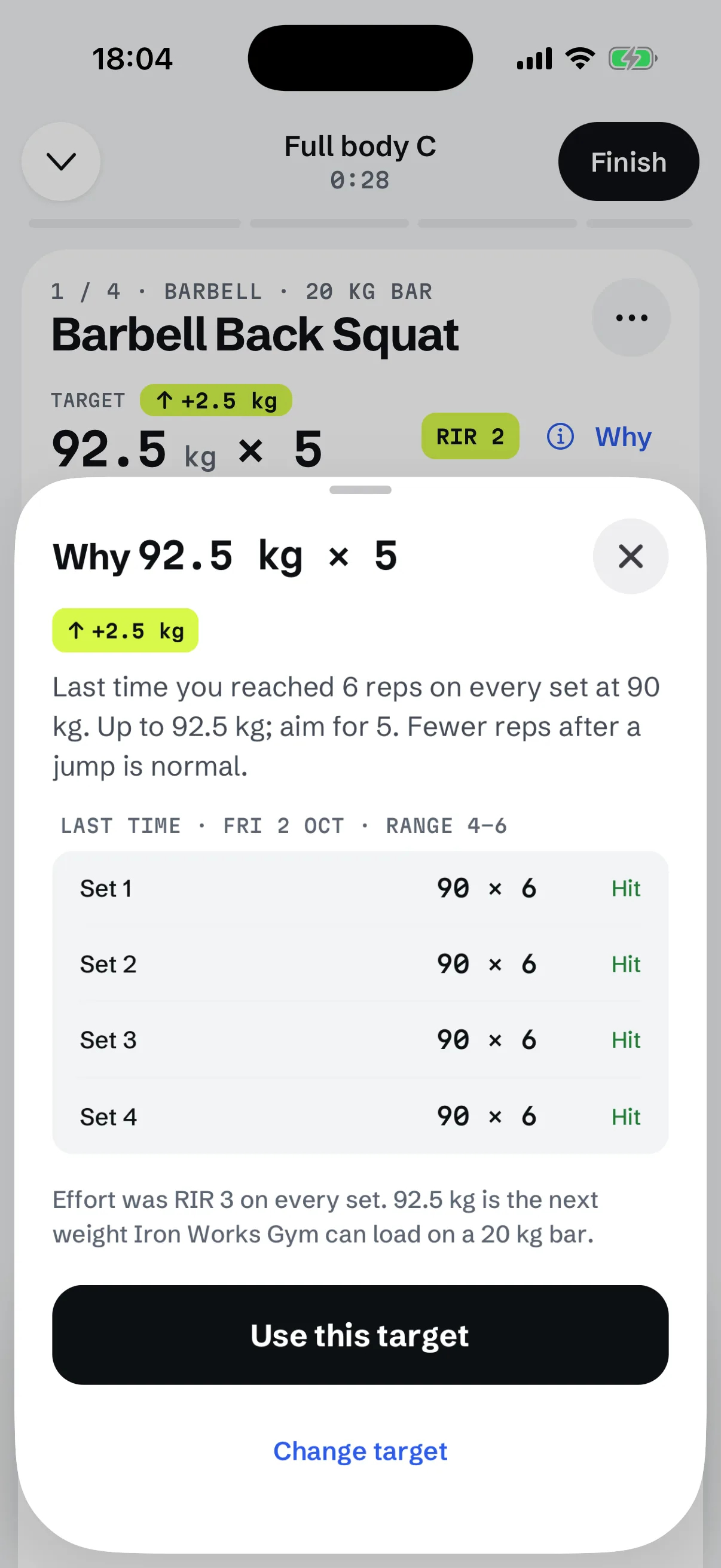
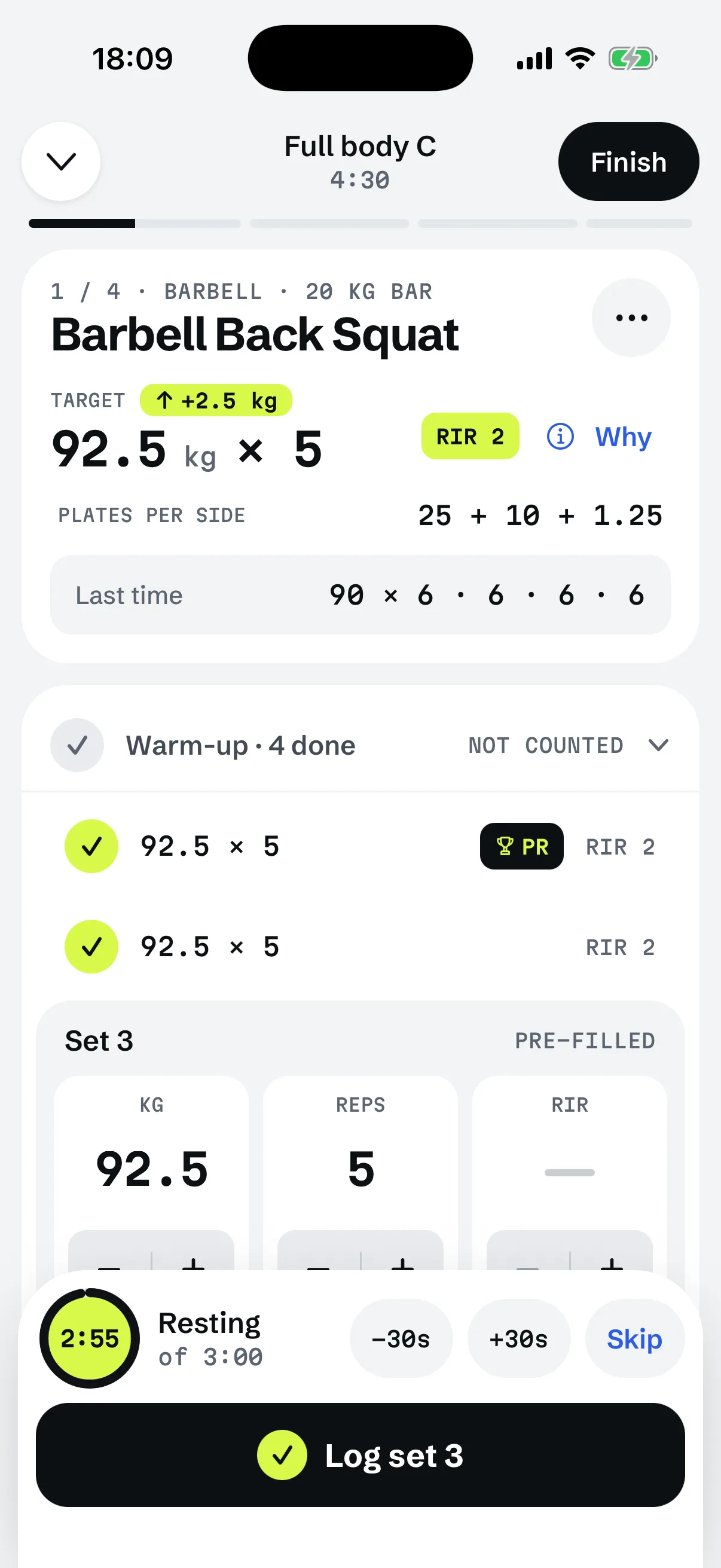
On the workout screen the target sits above a "Last time" line, and each set has its weight and reps pre-filled. RIR is yours to add. Logging a set is one tap when you hit the target. The same rule runs on paper, only slower.
RELATED TOOL1RM calculatorEstimate the most you could lift once, from a set you have already done.How do you track it properly?
Compare like with like, and be honest in the effort column.
- Same lift, same rep range, same loading. Change the range and last time no longer compares. A dumbbell lift is logged per dumbbell, a barbell lift with the bar counted, always the same way.
- Judge every set, not the best one. One set at the top does not move the weight. All of them do.
- Count only working sets. Warm-ups stay out of the log.
- Round to a weight you can load. The next target is the next weight your gym can make, not a calculated number.
- Read the effort with a grain of salt. A review of 12 studies and 414 participants found people tended to underpredict the reps they had left by about one (Halperin 2022), and guessed better closer to failure and with heavier loads. A number written down every session is still useful because it is yours and it is steady.
The American College of Sports Medicine's version of the progression rule is the same shape: raise the load by 2 to 10% once you can do one or two reps more than the target (ACSM 2009). The studies on this page support the rule the log feeds.
What if the numbers stop going up?
The log shows it before you feel it. Repeat the weight after one session with a set under the bottom of the range. After two in a row at the same weight, take 10% off that lift, rounded down to a weight you can load, and climb again by the same rule: 92.5 kg becomes 82.5 kg. Three sessions at the same weight with no more total reps in the newest than the oldest count as a stall and drop the same 10%.
A planned lighter week is not a failure and does not set the next target. See deload weeks.
When does a log not help?
- Your first session of a lift. There is no last line to read. Pick a weight you can lift for the range with the planned reps in reserve and log from there.
- Swapping an exercise. A new lift starts a new log. It does not borrow another lift's weight.
- An easier day or a deload. Write it down, but do not use it as the line you beat.
For a plan that already runs on this rule, a 3 day full body workout is a place to start.
RIGOR keeps the log and sets the next step
Questions
How do you track progressive overload?
Log the weight, the reps of each set and the reps in reserve for every lift. Next time, look at the last line first and ask whether every set reached the top of the rep range.
How do you track progressive overload in the gym?
Write each set as you finish it, not at the end of the workout. A notebook with a column for weight, reps and reps in reserve is enough.
What is the best way to track progressive overload?
The way you will keep doing: one line per lift, the same three columns every time, and a rule for the next target so the numbers get used.
How do you track progressive overload with an app?
Pick one that shows last time beside today's target and says why the target changed. RIGOR does this: it sets the next weight and reps after each workout and its Why sheet shows the rule.
How do you properly track progressive overload?
Compare like with like: the same lift, the same rep range and the same way of loading it. Judge by every set, not the best one, and note the effort.
Does tracking workouts improve results?
The studies cited here did not test logging itself, so there is no number to give. What they show is that adding reps or adding weight both worked, and both need a record of last time to follow.